Cursor vs Windsurf: Which AI Code Editor Is Better in 2026?
Cursor and Windsurf are the two most popular AI-first code editors. Here is how they compare on autocomplete, agentic features, pricing, and who each one is built for.
TL;DR
Both Cursor and Windsurf are VS Code forks with AI built in. Cursor is the more established choice with a larger community and better model flexibility — you can use Claude, GPT-4o, and others. Windsurf’s Cascade feature takes a more autonomous approach, handling multi-step tasks with less back-and-forth. Cursor is better if you want control. Windsurf is worth trying if you want AI that takes more initiative.
Quick comparison
| Cursor | Windsurf | |
|---|---|---|
| Base editor | VS Code fork | VS Code fork |
| Company | Anysphere | Codeium |
| Autocomplete | Strong, context-aware | Strong, slightly more aggressive |
| Agentic mode | Composer (multi-file) | Cascade |
| Model choice | Claude, GPT-4o, Gemini, others | Codeium models + Claude |
| Free tier | Yes (limited) | Yes (more generous) |
| Pro pricing | ~$20/mo | ~$15/mo |
| Community size | Larger | Growing |
What is Cursor?
Cursor is an AI-first code editor built as a fork of VS Code. It keeps everything VS Code users know — extensions, keybindings, the same interface — and adds AI deep into the editing experience.
The flagship feature is Tab autocomplete: context-aware completions that predict not just the next word but the next logical block of code. Chat lets you ask questions about your codebase. Composer handles multi-file edits, letting you describe a change that touches multiple files and having Cursor apply it across all of them.
Cursor lets you choose which AI model to use: Claude Sonnet, Claude Opus, GPT-4o, Gemini, and others depending on your plan. This model flexibility is a practical advantage — you can route different tasks to the model that handles them best.
Who it’s for: Professional developers who want AI in their editor without changing their workflow.
What is Windsurf?
Windsurf is built by Codeium, a company that started with AI autocomplete for existing editors before building their own. Like Cursor, it’s a VS Code fork with AI built in.
Windsurf’s main differentiator is Cascade, their agentic mode. Where Cursor’s Composer asks you to confirm changes step by step, Cascade is more autonomous — it plans and executes multi-step tasks with less interruption. The trade-off is that it can go further in a direction before you realize it’s off track.
The free tier is more generous than Cursor’s, which makes it a lower-friction way to try AI-first editing.
Who it’s for: Developers who want AI that takes more initiative and requires less hand-holding per task.
Head-to-head
Autocomplete
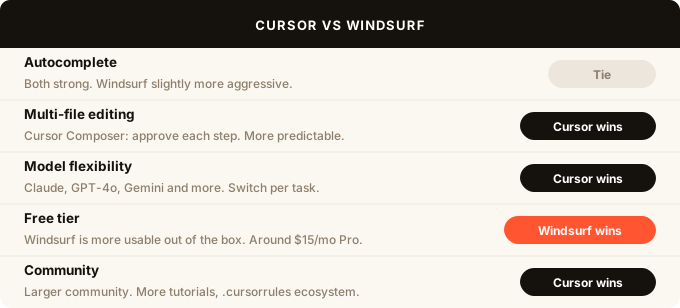
Both tools have strong, context-aware autocomplete that goes beyond single-line suggestions. Cursor’s Tab completion is well-regarded and has been refined over time. Windsurf’s is slightly more aggressive — it predicts and applies larger blocks, which is either faster or more intrusive depending on how you work.
Cursor wins on consistency and reliability. Windsurf wins on ambition.
Multi-file editing
Cursor’s Composer lets you describe a change, see a plan, and approve or reject each file diff before it’s applied. You stay in control throughout.
Windsurf’s Cascade is more autonomous. You describe the task and Cascade executes it — often correctly, sometimes not. When it works, it’s faster than the confirm-each-step approach. When it goes off track, it can make a lot of changes you need to unwind.
Cursor is better here if you want predictability. Windsurf is better if you trust the AI more.
Model choice
Cursor gives you access to Claude, GPT-4o, Gemini, and other models. You can switch per task or per project. This is a meaningful advantage for developers who have formed opinions about which model handles which types of code better.
Windsurf uses Codeium’s own models plus Claude access on paid plans. Less flexibility, but the Codeium models are competitive for code-specific tasks.
Pricing
Cursor Pro is around $20/mo. Windsurf Pro is around $15/mo. Both have free tiers, but Windsurf’s free tier is more usable for ongoing work.
If price is the deciding factor, Windsurf is the better deal.
Community and extensions
Cursor has a larger, more active community. More tutorials, more people sharing setups and prompts, more answers when things go wrong. The .cursorrules ecosystem — where developers share optimised prompts for specific stacks — is mature.
Windsurf is growing fast but the community is smaller. Fewer tutorials, less collective knowledge.
Which should you use?
Choose Cursor if:
- You want the most established AI editor with the best community
- Model flexibility matters — you want Claude, GPT-4o, or Gemini depending on the task
- You prefer reviewing and approving each change rather than letting AI run autonomously
- You’re on a team and want a consistent, well-documented setup
Choose Windsurf if:
- You want AI that takes more initiative with less step-by-step approval
- The free tier matters — Windsurf’s is more usable
- You want to try the autonomous Cascade approach before committing
Both are worth trying. The free tiers are generous enough to get a real sense of each within a week of normal use.
What about GitHub Copilot?
GitHub Copilot is still widely used, especially in teams already on GitHub. It integrates directly into VS Code, JetBrains, and other editors without requiring a separate fork. The trade-off is that it’s less capable as a full agentic tool — better at autocomplete and chat than at multi-file changes.
If you’re committed to staying in your existing editor rather than switching to a fork, Copilot is the strongest option. If you’re willing to switch to a dedicated AI editor, Cursor or Windsurf will give you more capability.
FAQ
Is Cursor better than Copilot? For most use cases, yes. Cursor’s Composer handles multi-file edits and agentic tasks that Copilot doesn’t match. Copilot has the advantage of staying in your existing editor without a fork switch.
Is Windsurf free? Windsurf has a free tier that is more generous than Cursor’s. Paid plans start around $15/mo for Pro features including faster model access and Cascade credits.
Does Cursor work with Claude? Yes. Cursor supports Claude Sonnet and Claude Opus on paid plans, as well as GPT-4o, Gemini, and other models. You can switch models per session or per task.
Can I use my VS Code extensions in Cursor or Windsurf? Yes. Both are VS Code forks and support the VS Code extension marketplace. Your existing extensions, themes, and keybindings transfer over.
Which AI code editor do professional developers use? Cursor is the most widely used AI-first editor among professional developers in 2026. Windsurf is the fastest-growing competitor. Both are meaningfully ahead of Copilot in agentic capability.
What is the difference between Cursor and Windsurf? Both are VS Code forks with AI built in. Cursor offers more model flexibility and a larger community. Windsurf’s Cascade mode is more autonomous, handling multi-step tasks with less back-and-forth. Cursor is better for developers who want control. Windsurf is better for those who want the AI to take more initiative.