How to Build an App Without Coding in 2026
A step-by-step guide to building a real app without writing any code. Which tools to use, how to describe what you want, and what to do when things go wrong.
TL;DR
Building an app without coding is genuinely possible in 2026. Tools like omg.dev, Lovable, and Bolt generate full-stack apps (frontend, database, authentication) from a plain English description. The process takes minutes to get something running. The skill you need isn’t coding. It’s knowing what to build and being able to describe it clearly.
What “no-code” actually means now
A few years ago, “no-code” meant dragging and dropping components in a visual builder. You could build a landing page, a simple form, or a basic website. Anything with real logic, a database, or user accounts required a developer.
That changed with AI app builders. Tools like Lovable and Bolt generate the actual code for you. You describe what you want in plain English, and the AI builds a complete, working application: frontend design, database schema, user authentication, and deployment. You never see the code if you don’t want to.
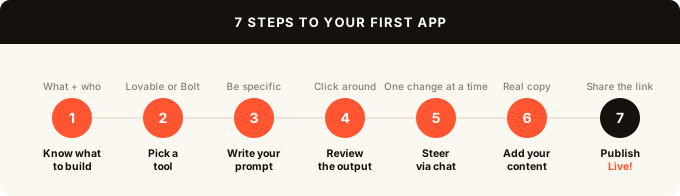
Step 1: Know what you want to build
The clearer your description, the better the result. Before opening any tool, spend a few minutes answering:
- What does the app do? (one sentence)
- Who uses it?
- What can users do in it? (list 3-5 actions)
- Does it need user accounts?
- Does it need to store any data?
A concrete example works far better than a vague one. “A task manager where users can create projects, add tasks with due dates, and mark them complete” gives the AI much more to work with than “a productivity app.”
Step 2: Pick the right tool
omg.dev is the tool we use in this guide. You describe your app, and it generates a full-stack app with a database and auth built in. The Inspect view shows your live database in real time, so when something breaks you can see exactly what’s being stored and what isn’t. That visibility makes a real difference when you’re debugging without any coding background.
Lovable takes a similar approach: describe your app, get a full-stack result with hosting included. The output is polished and the onboarding is smooth. The pricing is credit-based, which can get expensive fast during heavy debugging sessions.
Bolt shows you the code as it generates. Better if you want to see what’s being built or make manual edits. Token-based pricing is more predictable than credits.
All three generate real, deployable apps from plain English. The steps below work with any of them.
Step 3: Write your first prompt
Go to omg.dev and create a new project. On the new project screen, describe your app.
A good prompt has three parts:
- What it is: “A habit tracker app”
- What users can do: “Users can create habits, log daily completions, and view a streak calendar”
- Any specific requirements: “Users should be able to sign in with email. Habits should have categories.”
Put it together: “A habit tracker app where users sign in with email. They can create habits with names and categories, log each habit as complete each day, and see a streak calendar showing which days they completed each habit.”
That’s a prompt that will generate something usable.
Step 4: Review what it built
The first output takes about 30-60 seconds. Click around the preview and check:
- Does the layout make sense?
- Are the main things you described there?
- Does navigation work?
Don’t expect perfection on the first try. The goal is to see if the structure is right. You’ll iterate from here.
Step 5: Steer through conversation
This is where most beginners get confused. You’re not editing the app directly. You describe changes through conversation.
Instead of clicking on a button and changing its color, you say: “Make the ‘Log habit’ button larger and change it to orange.”
Instead of editing a database field, you say: “Add a ‘notes’ field to habits so users can write a short description.”
Tips for steering effectively:
- One change at a time. Describing five changes at once often leads to the AI getting confused or only doing some of them.
- Be specific about what you see. “The form on the habit creation page” is clearer than “the form.”
- If something is wrong, describe what’s wrong, not what to do. “The streak calendar is showing the wrong month” is more useful than trying to guess what code to change.
Step 6: Add your content
Once the structure feels right, add real content. Replace placeholder text with your actual copy. Update colors and fonts if needed. Add your logo.
Most AI app builders let you describe these changes the same way: “Change the app name from ‘HabitTrack’ to ‘Daily’ and update the header accordingly.”
Step 7: Share or publish
omg.dev deploys your app automatically. Every version gets a live URL you can share right away. When you’re ready for real users, click Publish and the app gets a permanent public URL.
If you bought a domain, connect it through the project settings with a CNAME record. Most tools support this with a few clicks.
What to do when things go wrong
The AI gets stuck in a loop. If you’ve described the same fix three times and it keeps getting it wrong, try rephrasing: describe the problem differently, or describe what the correct behavior should look like rather than what to change.
Something broke that was working. Go back to a previous version. Most AI app builders keep version history. Find the last version that worked and restore from there.
You can’t see why something is broken. This is the hardest problem with no-code AI tools. When a form doesn’t save or an auth flow fails silently, most tools give you no visibility into what went wrong. omg.dev’s Inspect view shows your live database and events in real time, so you can see exactly what’s being stored and what’s failing.
Realistic expectations
AI app builders are excellent for:
- Prototypes to test ideas with real users
- Internal tools for small teams
- Simple apps with standard patterns (todo lists, booking forms, dashboards, CRMs)
- Landing pages with a signup form or waitlist
They struggle with:
- Complex business logic with many edge cases
- Apps that need to handle thousands of concurrent users
- Integrations with unusual third-party APIs
- Anything that needs to be hardened for security before handling sensitive data
The apps you build with these tools are real and deployable. They’re not production-ready for every use case. But they’re far enough along to validate an idea, get users, and decide whether to invest in building something more robust.
FAQ
Can I really build an app without any coding knowledge? Yes. Tools like omg.dev, Lovable, and Bolt are designed for people without a coding background. You describe the app in plain English, and the tool handles the technical implementation.
How long does it take to build an app this way? A simple app with user accounts, a database, and a few pages takes 1-2 hours of iteration to get to something you can share with real users. A more complex app might take a few days of back-and-forth.
Is it free to build an app without coding? Most tools have free tiers. omg.dev has a free plan you can start with right now. Bolt offers 1M tokens/month free. Lovable has a limited free plan. Paid plans across these tools are typically $20-25/month.
What kind of apps can I build without coding? Most standard app types: task managers, booking systems, CRMs, inventory trackers, community platforms, internal dashboards, waitlist apps, and more. Anything with custom business logic, financial transactions, or high security requirements will eventually need a developer.
Will the app work on mobile? AI-generated apps are web apps that run in mobile browsers. They’re responsive by default. Native iOS or Android apps require different tools or a developer.
What happens to my app if I stop paying? It depends on the tool. Most will suspend new edits but keep the app accessible on a free plan. Always check the export or ownership terms before committing to a paid plan.
Is the app I build actually mine? Yes. You own the app and its data. If a tool lets you export the code, you can take it and host it yourself. Always check the terms around code ownership before committing to a paid plan.