Cursor vs Claude Code: Which AI Dev Tool Wins?
Comparing Cursor and Claude Code for building apps with AI. See which tool fits your workflow, skill level, and project type in 2026.
TL;DR
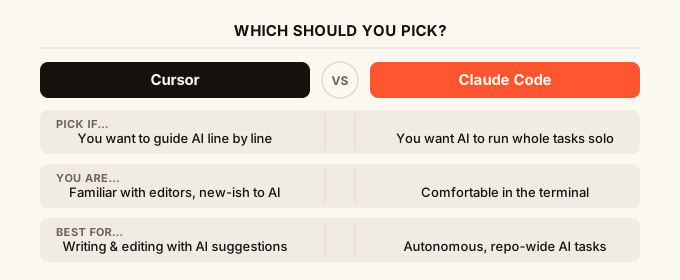
Cursor is a code editor (the app you type code inside) with AI baked in, best for people who want to write and edit code with smart suggestions. Claude Code is a terminal-based AI agent (a tool you run from the command line) that can plan, write, and run whole chunks of work on its own. If you want to stay in an editor and guide the AI line by line, Cursor wins. If you want an agent that can take a task and run with it, Claude Code wins.
Quick Comparison
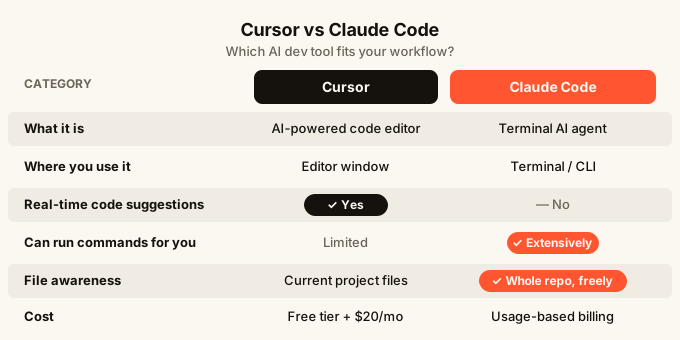
| Cursor | Claude Code | |
|---|---|---|
| What it is | AI-powered code editor | Terminal AI agent |
| Where you use it | Inside an editor window | Inside a terminal |
| Best for | Writing and editing code with AI help | Letting AI take on bigger tasks autonomously |
| Skill level needed | Some familiarity with code helps | Comfortable running commands |
| Works on mobile | No | No |
| Cost | Free tier, then $20/month | Usage-based billing |
| Real-time code suggestions | Yes | No |
| Can run commands for you | Limited | Yes, extensively |
| File awareness | Current project files | Whole repo, can browse and edit freely |
What is Cursor?
Cursor is a fork of VS Code, which means it started as a copy of the most popular free code editor in the world and then the Cursor team added AI features on top. If you have ever used VS Code, Cursor feels identical, except there is a chat panel on the side and the AI can see your files.
The main thing Cursor does is give you AI that knows your code. You can highlight a function and say “explain this” or “rewrite this to handle errors better” and it will do it in place. You can open a chat, ask it to write a new feature, and it will suggest code you can accept or reject. The AI also autocompletes as you type, guessing the next line or even the next whole block.
Cursor works on desktop only. It does not run in a browser, and there is no mobile version. To understand more about where Cursor fits in the broader landscape of AI coding tools, what is Cursor AI gives a thorough breakdown.
What is Claude Code?
Claude Code is Anthropic’s official AI agent that you run from a terminal (the text-only window on your computer where you type commands). You open your terminal, type a task in plain English, and Claude Code starts working through it: reading files, writing code, running tests, fixing errors, and repeating until the job is done or it needs your input.
The key difference from something like Cursor is that Claude Code is agentic. That word just means it can take multiple steps on its own without you approving each one. Tell it “add a login page to this project” and it will look at your existing code, decide what files to create or change, write them, and test them. You are more of a supervisor than a driver.
Because it lives in the terminal, Claude Code has no visual editor. You will not see your code highlighted and suggested in real time. It is a tool built for people who are comfortable saying “go do this” and checking back when it is done.
Head-to-Head: Cursor vs Claude Code
How you actually interact with it
With Cursor, you are always inside an editor. You see your files, your code, and a chat panel. Every suggestion appears inline and you press Tab to accept it or ignore it. You stay in the driver’s seat the whole time. It feels like having a very fast pair programmer sitting next to you.
With Claude Code, you type a task into a terminal and then wait. It might come back with a question, or it might just finish the job. The interaction is more like giving work to a junior developer: you describe what you want, they go off and do it, and you review the result. If you want to see what it is doing in real time, you can, but it is not the same as watching inline suggestions appear.
Code awareness and context
Cursor reads the files you have open and the project folder you point it at. It is very good at understanding the immediate area you are working in. When you ask it to change something, it knows the surrounding code well.
Claude Code can read your entire repository (the full collection of files that make up a project) and reason across all of it at once. If you ask it to trace a bug from the front of the app all the way to where the data is saved, it can follow that chain across many files without you guiding it.
For big, complex projects, Claude Code’s wider awareness is a real advantage. For focused, line-by-line work, Cursor’s tight editor integration is faster.
Handling big tasks vs small tasks
Cursor is great for small to medium tasks: write this function, fix this bug, refactor this file. The back-and-forth is quick and you stay in control.
Claude Code handles bigger, multi-step tasks better. It can take something like “set up a new page with a form that saves data” and actually work through it without you breaking the task into steps. That said, the bigger the task, the more likely it is to make a decision you disagree with, so you still need to review the output carefully.
When things go wrong
With Cursor, errors are visible immediately. If the AI writes something wrong, you see it in the editor and can fix it or ask Cursor to fix it.
Claude Code can sometimes go down a wrong path for several steps before surfacing a problem. Because it is running more autonomously, mistakes can compound. Most developers who use it heavily learn to give it specific, well-scoped tasks rather than very open-ended ones.
Cost
Cursor has a free tier with limited AI usage per month, and the paid plan is $20 per month for more capacity. For a comparison of Cursor with another popular option, see Cursor vs Windsurf.
Claude Code charges based on how much AI processing your tasks use, which is harder to predict month to month. Light usage can be cheap. Heavy usage on big projects adds up faster than a flat subscription.
Working with non-technical teammates
If you are building something with people who do not write code, neither Cursor nor Claude Code is really designed for them. Both tools assume you can at least read code, run a terminal, or navigate an editor. For teams where some members are not developers at all, a visual AI builder like omg.dev is built for exactly that situation, with a phone-friendly interface and no terminal or editor required.
Which Should You Use?
The honest answer is that many developers end up using both. But if you have to pick one, here is how to think about it.
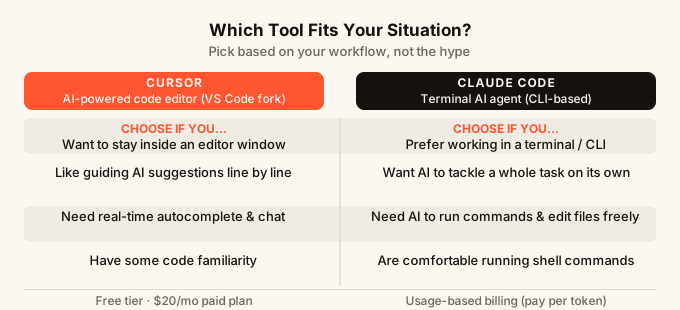
Choose Cursor if you spend most of your time writing and editing code in an editor, you want suggestions as you type, and you prefer to stay in control of every change. It fits well into a familiar workflow. It is also a gentler starting point if you are newer to AI coding tools. If you are comparing more options in this space, best AI code editors 2026 is worth reading.
Choose Claude Code if you are comfortable with the terminal, you have whole features or tasks you want to hand off, and you would rather review finished work than guide every step. It is particularly useful for experienced developers who want to move faster on repetitive or large-scope work. A deeper look at how Claude Code compares on specific workflows is in Claude Code slash commands.
Choose neither if you are not a developer and just want to build something useful without writing code. Both Cursor and Claude Code are tools for people who work with code day to day. If you want to build a real app without writing any, the how to build an app without coding guide is a better place to start.
The rise of both these tools is part of a bigger shift in how people build software. If you want to understand that shift, what is vibe coding explains where all of this is coming from and where it is headed.
FAQ
Is Claude Code better than Cursor? Neither is better in all situations. Cursor is better for real-time code suggestions and staying in an editor. Claude Code is better for handing off bigger tasks and letting AI work through them on its own. Most developers use both depending on the task.
Do I need to know how to code to use Cursor or Claude Code? You will get more out of both tools if you can read and understand code. Cursor is the gentler starting point because it works inside a familiar editor. Claude Code requires comfort with the terminal. If you do not write code at all, there are other AI builders better suited for you.
How much does Claude Code cost compared to Cursor? Cursor has a predictable $20/month paid plan. Claude Code uses usage-based billing, so the cost depends on how much you use it. Light usage can be inexpensive, but heavy use on large projects will cost more.
Can I use Cursor and Claude Code together? Yes. Many developers use Cursor for day-to-day editing and Claude Code when they want to run a bigger task without babysitting it. They complement each other well because they work in different ways.
Which tool handles large codebases better? Claude Code has an edge here. It can read across an entire repository and reason about how different parts connect. Cursor focuses more tightly on what is open in front of you, which is fine for most work but less suited to tracing something across dozens of files.
Is GitHub Copilot worth considering too? GitHub Copilot is another popular AI coding tool in the same general category as Cursor. If you are weighing options, GitHub Copilot vs Cursor compares the two in detail.
What if I want to build an app without any of these tools? If writing code is not your thing, AI app builders like omg.dev let you describe what you want in plain English and build it from your phone, with sign-in, data storage, and hosting all included. No terminal, no editor, no setup required.