Bolt vs Replit: Which AI App Builder Should You Use?
Bolt.new vs Replit compared for non-developers. See which AI app builder actually gets your app shipped faster in 2026.
TL;DR
Bolt.new turns a text prompt into a working app in minutes with no setup at all. Replit is a full cloud coding environment (a coding workspace that runs in your browser) that is better suited to people who want to write or tweak actual code. If you just want to ship something without writing code, Bolt is the faster on-ramp. If you expect to spend real time inside the code itself, Replit gives you more room to work.
Quick comparison
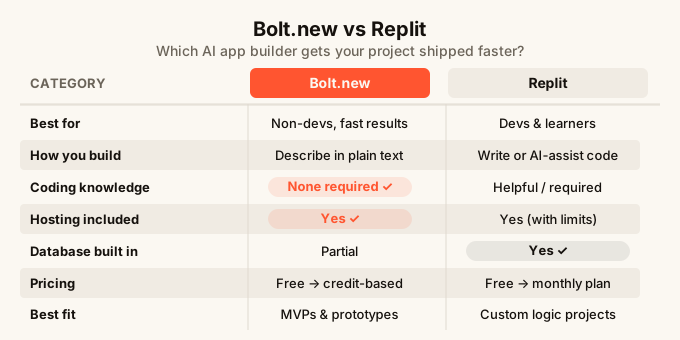
| Bolt.new | Replit | |
|---|---|---|
| Best for | Non-developers who want a fast result | Developers or learners who want to code |
| How you build | Describe what you want in plain text | Write code, or use AI to help you write it |
| Coding knowledge needed | None | Helpful, sometimes required |
| Works from a phone | Not really | No |
| Hosting included | Yes | Yes (with limitations) |
| Real-time multiplayer | No | No |
| Database built in | Partial | Yes |
| Price to start | Free tier, then credit-based | Free tier, then monthly plans |
| Best fit | Side projects, MVPs, quick prototypes | Learning to code, full projects with custom logic |
What is Bolt.new?
Bolt.new is a prompt-to-app tool. You type what you want, and the AI builds it. No files to open, no terminal (the text-based command window that developers use), no package manager (a tool that downloads and manages code libraries). You describe “a task tracker with a dark theme and a column for priority,” and a few seconds later you have a working app in front of you.
The experience is designed for people who are not developers. The whole point is that the gap between idea and working product is as small as possible.
Bolt does generate real code behind the scenes, and you can look at it. But you do not have to. Most people who use Bolt never open a single file. They just keep prompting until the app does what they want.
Where Bolt runs into trouble is when your app needs something unusual. Custom logic that the AI does not understand well, complex data relationships (like a database where one record can link to many others), or anything that needs a back-end service (the part of an app that handles data and business rules on a server) that is not baked in. At that point, you either prompt your way through it or get stuck.
What is Replit?
Replit is a cloud-based coding environment. Think of it as a full coding workspace that lives in your browser. You get a file editor, a terminal, and a way to run code, all without installing anything on your computer.
Replit has added a lot of AI features over the years. There is an AI assistant that can write code, explain what code does, and help you fix bugs (errors in the code). For someone learning to code, or for a developer who wants a quick environment without setup, Replit is genuinely useful.
But Replit assumes you are comfortable spending time inside code. Even with the AI helping, you will read error messages, adjust files, and make decisions that require at least some coding knowledge. It is not really a “describe it and ship it” tool. It is a “write it and ship it” tool where AI helps you write faster.
Replit also has a strong community angle. There are tutorials, a public gallery of projects, and an active forum. If you want to learn while you build, that ecosystem can be helpful.
Bolt vs Replit: head-to-head
Getting started
Bolt wins on speed. Sign up, type a prompt, and your app is running in under a minute. There is no project to configure, no environment to set up, no decisions to make before you see something on screen.
Replit takes longer to get comfortable with. You pick a language (like Python or JavaScript, two common programming languages), set up a project, and then start writing. The AI can help, but you are still in a coding environment. If you have never written code before, the interface can feel overwhelming.
Building without code
This is where the tools diverge most clearly.
Bolt is designed for people who do not write code. Every interaction is in plain English. You describe what you want, the AI builds it, and you react to what you see. If you have heard the phrase vibe coding (building apps by describing what you want in natural language rather than writing code line by line), Bolt is one of the clearest examples of it in practice.
Replit is not a vibe coding tool. It is a coding tool with AI assistance. The AI can generate whole files of code for you, but you are still the one deciding where to put them, what to name things, and how the pieces fit together. That is not hard once you have done it a few times, but it is a real barrier for someone who has never opened a code editor before.
What you can actually build
Both tools can produce real, working apps. The question is what kind.
Bolt is strong for front-end-focused apps: tools with nice interfaces, forms, dashboards (pages that display data visually), and CRUD apps (apps that let you Create, Read, Update, and Delete records). It handles those quickly and well.
Replit can handle a wider range of technical projects. You can build bots, scripts (small programs that do a single task automatically), APIs (a way for two pieces of software to talk to each other), and projects that need unusual dependencies (extra code libraries your app relies on). The trade-off is that building those things takes more skill and time.
Hosting and going live
Both tools include hosting, which means your app gets a public web address without you needing to set up a separate service.
Bolt gives you a live URL (a web address anyone can visit) immediately. Bolt apps are designed to deploy in one step.
Replit also gives you a URL, but the free plan has limitations: apps can “sleep” (pause and take a few seconds to wake up) when no one has visited in a while. For a real product people rely on every day, you would want a paid plan.
Neither tool is a long-term production hosting solution (the kind of infrastructure that runs apps used by thousands of people every day). For serious scale, you would eventually move elsewhere. But for prototypes, side projects, and early-stage products, both work fine.
Fixing things when they break
This is where both tools show their limits.
In Bolt, when something goes wrong, you describe the problem in plain English and hope the AI figures it out. That works surprisingly often. When it does not, you are stuck unless you can read the code yourself.
In Replit, you have more tools to dig into problems. You can read error messages, search for answers, use the terminal, and ask the AI to explain what went wrong. That is more powerful, but only if you have the knowledge to use those tools.
If you are not a developer and you hit a wall, Bolt’s conversational approach is more forgiving. If you are comfortable with code, Replit gives you more control.
Price
Both have free tiers that let you try before you buy.
Bolt charges based on credits (tokens the AI uses to build and edit your app). Free credits run out, and more cost money. Heavy use adds up fast, especially if you are going back and forth on a complex project.
Replit charges a monthly subscription for the features that matter most: always-on hosting, more compute power, and priority AI access. The free tier is useful for learning and experimenting, less so for anything you want people to actually use.
Neither is cheap at scale. Both are priced for early-stage builders who do not need massive resources.

Who should use Bolt?
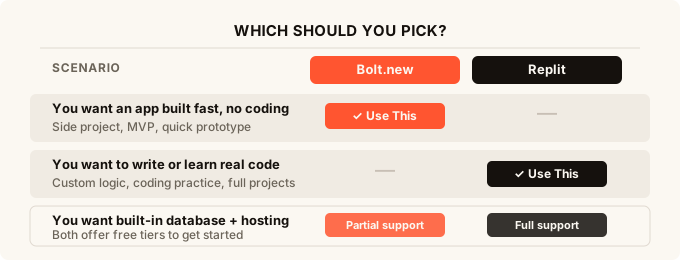
Use Bolt if your main goal is to get from idea to something real as fast as possible, and you do not want to write any code. It is a good fit for founders testing an idea, freelancers building a simple client tool, or anyone who wants a working prototype they can show someone else by the end of the day.
It is also a good first step before you decide whether to invest more time or money in something bigger. Build it fast in Bolt, see if people like it, then decide what to do next.
For more on this approach, the how to build an app without coding guide goes deeper into the options.
Who should use Replit?
Use Replit if you want to actually learn how code works while you build, or if you are already a developer who wants a browser-based environment with no installation. Replit is also a better fit if your project needs custom server-side logic (code that runs on the server, not just in the browser) or unusual technical requirements.
Students, hobbyists who want to get into programming, and developers who want a quick scratch pad all get real value from Replit.
What if neither is quite right?
Both tools require a desktop or laptop for any serious work, and neither gives you the full picture before you start building. If you want to see what your app looks like before any code is generated, or if you want to build from your phone, you need a different approach.
Tools like omg.dev are designed for exactly that. It has a design-first mode where you review how your app will look before anything gets built, and it is the only AI app builder designed to work properly from a phone. If you want to read about the full range of options, the best AI app builder guide for 2026 covers the field.
If you want to compare Bolt with other popular tools, the Lovable vs Bolt breakdown is worth reading too.
FAQ
Is Bolt.new better than Replit for beginners? For people who have never written code, yes. Bolt lets you describe what you want in plain English and see a working app without touching any files. Replit assumes you are ready to spend time inside a code editor, even with AI assistance.
Can Replit build apps without any coding? To a point. The AI can generate code for you, but you are still working inside a coding environment. You will need to understand what files are, how to run your project, and what to do when something breaks. It is not a no-code tool.
Does Bolt.new have a database? Bolt can connect to external databases, but it does not come with a built-in one the way some all-in-one builders do. For simple apps, this is fine. For anything that needs to save user data reliably, it is a real limitation worth thinking about before you start.
Which is cheaper, Bolt or Replit? It depends on how you use them. Bolt’s credit-based pricing means light use is cheap and heavy use gets expensive quickly. Replit’s subscription model is more predictable if you are building something ongoing. Try both free tiers before committing to either.
Can I host a real product on Bolt or Replit? Both give you a live URL, and both work fine for prototypes or early-stage projects. For something used by a lot of people every day, you would eventually want more reliable, dedicated hosting. Neither is built for large-scale production traffic.
What about Lovable and other AI app builders? There are several tools in this space now, each with a different angle. The Lovable alternatives article runs through the main options and who each one suits best.
What if I want to build from my phone? Neither Bolt nor Replit works well on a phone. Both are designed for desktop browsers. If building on your phone matters to you, look at tools built with mobile in mind from the start.