Replit vs Cursor: Which AI Coding Tool Is Right for You?
Replit vs Cursor compared: cloud IDE vs desktop editor, who each tool is for, and how to choose. Honest breakdown for builders in 2026.
TL;DR
Replit runs entirely in your browser, so you can code from any device with nothing to install. Cursor is a desktop app that sits on top of your existing code editor and is built for professional developers who want AI assistance inside their usual workflow. If you are a beginner or want to ship something fast without setup, Replit is the faster on-ramp. If you already write code and want smarter autocomplete and AI chat inside a powerful editor, Cursor wins.
Quick Comparison
| Replit | Cursor | |
|---|---|---|
| Where it runs | Browser (cloud) | Desktop app |
| Best for | Beginners, quick projects, learning | Developers who already code |
| Setup time | Zero — open a tab and go | ~5 minutes to install |
| AI features | AI chat, code generation, Replit Agent | Autocomplete, AI chat, codebase Q&A |
| Works on phone | Browser only, not optimised | No |
| Hosting included | Yes | No |
| Free tier | Yes | Yes (limited) |
| Paid plans | From $25/month | From $20/month |
| Works with your own code | Import from GitHub | Yes, opens any local folder |
What Is Replit?
Replit is a cloud-based IDE (an app where you write and run code) that lives entirely in your browser. You open a tab, pick a language or template, and start writing. There is nothing to download, no local setup, no managing which version of a programming language is installed on your machine.
It was originally built for learning and teaching code, and that DNA still shows. The interface is friendly, templates are easy to start from, and you can share a link to your project for anyone to see or fork (copy and remix for themselves).
Over the past couple of years, Replit has pushed hard into AI features. Replit Agent is their most ambitious one: you describe an app in plain English and it tries to build the whole thing, not just autocomplete a line. It will set up files, write code, and even handle some of the plumbing that normally trips up beginners. The results are hit or miss, but for simple projects it can get you surprisingly far.
Replit also hosts your app for you. When you hit Run, it is live at a URL you can share. That all-in-one quality is a big part of its appeal.
What Is Cursor?
Cursor is a desktop code editor (software you install and use to write code) built on top of VS Code, which is the most popular code editor in the world. If you have used VS Code, Cursor looks almost identical. The difference is that Cursor has AI woven into every part of the experience.
You get AI autocomplete that thinks ahead further than standard tools, an in-editor chat where you can ask questions about your own code, and a feature called Composer that lets you describe a change and have the AI apply it across multiple files at once. There is also a mode that lets you ask questions about your whole codebase (the entire collection of code files that make up your app), which is useful when a project gets large.
Cursor is aimed squarely at people who already write code. It does not host your app, does not provide a database, and does not manage your environment. You bring the code; it helps you write it faster. For a deeper look at what Cursor does under the hood, see our guide to Cursor AI.

Replit vs Cursor: Head-to-Head
Getting Started
Replit wins on setup speed. You create an account, click a template, and you are writing code in under two minutes. There is nothing to install, no package manager (a tool that downloads code libraries your app needs) to configure, and no environment to set up.
Cursor requires you to download an app, install it, and point it at a folder of code. That is not hard, but it assumes you have code to point it at. If you are starting from scratch, you still need to set up a project yourself or pull one from elsewhere.
For a total beginner, Replit’s zero-friction start is genuinely valuable. For someone with an existing project, Cursor slots in without disrupting anything.
AI Features
Both tools have AI at the centre, but they do different jobs.
Replit’s AI is best for generation: you describe something and it tries to build it. Replit Agent will take a prompt like “build me a to-do app with user sign-in” and produce a working project. It is not always right on the first try, but it handles a lot of the scaffolding (the basic structure of files and folders an app needs) that would otherwise slow you down.
Cursor’s AI is best for editing and understanding code you already have. Its autocomplete is fast and context-aware, meaning it picks up on patterns in your specific project rather than giving generic suggestions. The chat can answer questions like “why is this function slow?” or “what does this file do?” It shines when you are deep in a project and need a thinking partner, not when you are starting from zero.
If you want to go deeper on Cursor’s strengths, our Cursor vs Claude Code comparison is worth reading.
Collaboration
Replit has built-in multiplayer editing (multiple people working on the same code at the same time), similar to Google Docs. You share a link and a teammate can jump in. This makes it a popular choice for pair programming sessions and classroom settings.
Cursor does not have built-in collaboration. It is a solo editor. For team workflows, you would use a version control system (a tool like Git that tracks changes and helps teams merge their work) alongside it, which is standard practice for developers but adds complexity for beginners.
Hosting and Deployment
Replit hosts your app automatically. Hit Run, and your project is live. For quick prototypes (early rough versions of an app you want to test), this is a huge time-saver. The catch is that free-tier projects sleep when no one is using them, which means the first visitor after a gap waits for the app to wake up.
Cursor has no hosting at all. It is a code editor. Getting your app live requires a separate hosting service, which you would pick and connect yourself.
Working with Bigger Projects
This is where Cursor pulls away. For large codebases (projects with hundreds or thousands of files), Cursor’s ability to search, understand, and edit across the whole project is far ahead of Replit. Replit’s editor is functional, but it was not designed for the kind of complex, multi-file work that professional developers do daily.
If your project is small or medium-sized, this difference probably does not matter. If you are building something that grows over months with a team, Cursor is a much better fit.
Price
Both have free tiers. Replit’s paid plan starts at around $25 per month and includes more compute (the processing power used to run your code) and better AI access. Cursor’s paid plan starts at around $20 per month and unlocks more AI requests per month.
Neither is cheap if you use it heavily. That said, for the number of tokens (the small chunks of text AI processes and generates) you get, both are competitive with buying AI access directly.
Which Should You Use?
Pick Replit if:
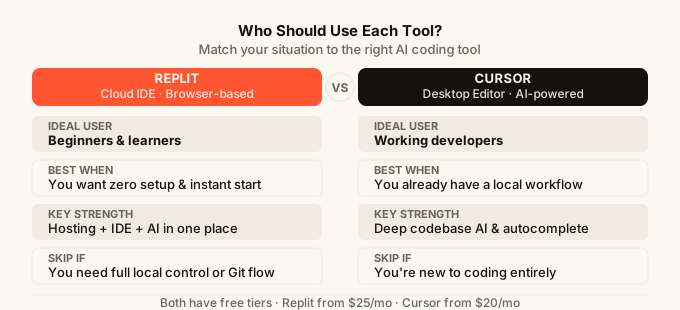
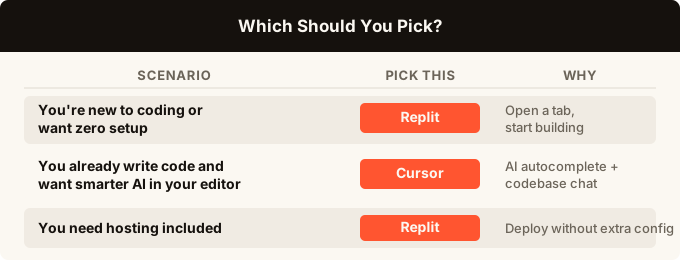
You are new to coding and want to learn without fighting your environment. You want to build and share a small project fast. You value having everything (editor, hosting, collaboration) in one place. You want to use AI to generate a first version of something rather than edit existing code.
Pick Cursor if:
You already write code regularly and want AI to speed up your existing workflow. You work on larger projects. You want the best AI autocomplete available in a desktop editor. You are comfortable managing your own hosting and project setup.
A third path:
Both Replit and Cursor assume you are writing code, even if AI helps. If you are not a developer and just want to ship an app without writing code at all, both tools have a steep learning cliff regardless of their AI features. Tools like omg.dev take a different approach: you describe what you want, review the design, and publish, all from your phone, with hosting, sign-in, and real-time features already built in.
For a broader look at how these tools fit into the current landscape, see our best AI app builder 2026 guide and our breakdown of Lovable vs Bolt for other no-code-leaning options.
If you are deciding between Cursor and another editor-style tool, the Cursor vs Windsurf and GitHub Copilot vs Cursor comparisons are also worth a look.
FAQ
Can I use Replit and Cursor together?
Yes, and some developers do. They use Replit for quick experiments or when working away from their main machine, and Cursor for serious day-to-day work. They are not competing services that require you to pick one forever.
Is Replit good for learning to code?
It is one of the better places to start. You do not have to install anything, the interface is forgiving, and you can find millions of public projects to learn from. The AI features can also explain code to you, which is useful when you are learning.
Does Cursor work on Windows, Mac, and Linux?
Yes. Cursor is a desktop app available for all three operating systems.
Can Replit Agent build a complete app?
It can get surprisingly far on simple apps. Expect to review and fix things rather than expecting a finished product. For anything complex or with specific design requirements, treat Agent as a starting point, not a finisher.
What if I want to build an app without writing code at all?
That is a different category of tool altogether. Replit and Cursor both assume you are going to write or at least read code. If you want to describe an app and have it built, reviewed, and hosted without touching code, look at dedicated no-code AI app builders. Our guide to how to build an app without coding covers the options in detail.
Is Cursor just VS Code with AI?
That is a fair summary. It is built on the same foundation as VS Code, so most VS Code extensions work in Cursor and the interface feels familiar. The AI layer is what makes it different: deeper autocomplete, in-editor chat, and multi-file editing that standard VS Code does not have out of the box.
Which tool is better for solo side projects?
It depends on your experience. If you have never coded before, Replit is the faster path. If you write code already, Cursor will make your existing process noticeably faster. The honest answer is that the best tool is the one you will actually use. Both have free tiers, so trying them costs nothing.