Claude Code + omg.dev: drive your apps from the terminal
Install the omg.dev MCP in Claude Code with one command. OAuth setup, the available tools, and what to do when something breaks.
TL;DR
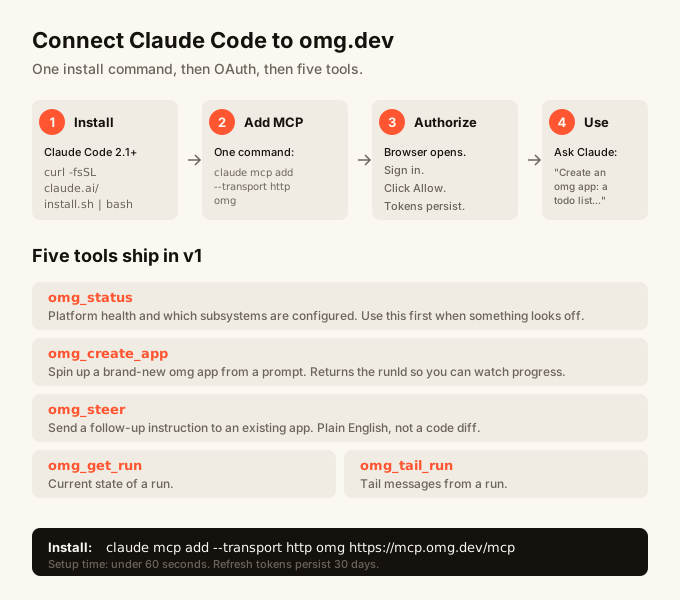
omg.dev now ships an OAuth-protected MCP server at mcp.omg.dev. Add it to Claude Code with one command: claude mcp add --transport http omg https://mcp.omg.dev/mcp. On first use Claude Code opens a browser, you sign in to omg.dev, click Allow, and from then on you can create apps, send follow-up instructions, and watch runs from any Claude Code session. Tokens persist for 30 days. Five tools ship in v1: omg_status, omg_create_app, omg_steer, omg_get_run, omg_tail_run.
Quick reference
Step 1: Install Claude Code if you don’t have it
Claude Code is Anthropic’s official terminal CLI. Install it with one line:
curl -fsSL https://claude.ai/install.sh | bashRun claude --version to confirm. The MCP plumbing this guide uses landed in 2.1; older versions won’t pick up the OAuth flow correctly.
Step 2: Add the omg.dev MCP
One command:
claude mcp add --transport http omg https://mcp.omg.dev/mcpThat stores the server at user scope, so it’s available from any project. claude mcp list shows the new entry as ! Needs authentication until the OAuth dance runs.
If you want it scoped to one project instead of all your projects, add -s project to that command.
Step 3: Trigger the OAuth dance
Open Claude Code in any directory and ask it to use the MCP. The simplest prompt:
Use omg_status and tell me what agentProvider is set to.Claude Code notices the omg-prod MCP needs auth, prints an authorize URL, and opens your browser. You’ll see:
- omg.dev’s sign-in page (skipped if you’re already signed in)
- A consent screen at
auth.omg.dev/oauth/consentlisting the scopes the MCP wants - A redirect to
localhost, which Claude Code’s listener catches
Click Allow. Claude Code exchanges the auth code for an access token plus a 30-day refresh token, stores them, and completes the original tool call. From this point on, the MCP shows as ✓ Connected in claude mcp list and you don’t see the OAuth flow again unless the refresh token expires.
Step 4: Use the tools
Five tools ship in v1. The model picks the right one based on your prompt, but if you want to call them explicitly:
omg_status
No arguments. Returns the platform health snapshot: which subsystems are configured (auth, mail, sandbox provider, settings encryption), the active agent backend, and the allowed origins for CORS. Use this first when something seems off.
Run omg_status and tell me if mail is configured.omg_create_app
Spins up a brand-new omg app from a natural-language prompt. Same flow as tapping New app in the dashboard: a fresh project, a fresh agent run, the slug allocated for you. Returns the runId so you can watch progress.
Create an omg app: a multiplayer todo list with email magic-link sign-in.omg_steer
Sends a follow-up instruction to an existing app. Plain English, not a code diff. Pass the runId from omg_create_app (or one you grabbed from the dashboard URL).
Steer run r_abc123: add a dark mode toggle in the top right.omg_get_run
Returns the current state of a run: status (queued, running, done, failed), phase, the most recent message. Useful for polling.
omg_tail_run
Tails recent messages from a run. Pass afterMessageCreatedAt to get only new messages since the last poll. Cheaper than omg_get_run for live updates.
Step 5: Verify it stuck
Open a fresh terminal and run:
claude -p "Call omg_status and tell me the agentProvider."If you see a one-line answer with agentProvider and the value, the tokens are persisted and working. If you see another “open this URL” prompt, the refresh token expired or never landed; redo Step 3.
What to do when things go wrong
”! Needs authentication” never goes away
Claude Code stores OAuth tokens after a successful run, not after claude mcp add. The first tool call is what triggers the flow. If you ran a tool but still see the warning, check that the model actually called the tool (sometimes it answers from training data instead). Try a prompt that forces it: Use the omg_status tool. Do not answer from memory.
Browser opens but the consent page is blank
The session cookie didn’t load. Sign in at omg.dev in the same browser first, then retry. The .omg.dev cookie domain is shared, so once you’re signed in to the dashboard, auth.omg.dev sees the same session.
”requested resource invalid” at the token endpoint
This is a server-side check that the resource URL the client requested matches the allow-list. Both https://mcp.omg.dev and https://mcp.omg.dev/ are accepted. If you’re seeing this from a custom client, you sent a different URL. Match one of the two.
Tool calls work but Convex returns Unauthorized
The token’s audience claim doesn’t match what Convex expects. Same two forms (https://mcp.omg.dev and the trailing-slash variant) are accepted on the Convex side. If you minted a token manually with a different audience, that’s the cause.
My app is the dashboard at omg.dev, not the MCP. Is this useful for me?
You don’t need this to use omg.dev. The MCP exists for people who want to drive their omg account from Claude Code without switching tabs. If you build on omg.dev from your phone or browser, ignore the MCP. It’s an option, not a requirement.
FAQ
What is an MCP server?
Model Context Protocol (MCP) is a standard that lets external tools and data sources plug into AI assistants. An MCP server exposes a set of tools (like omg_status) that the assistant can call. Claude Code reads which MCPs are available and lets the model invoke their tools as part of a conversation.
Why does omg.dev have an MCP server? So you can build and edit omg apps from Claude Code without leaving your terminal. The dashboard at omg.dev is the canonical place to build on the platform (and the best one if you’re on your phone), but if you live in Claude Code, the MCP gives you the same kickoff and steer flow.
Is the MCP only for Claude Code?
No. Any client that speaks Streamable HTTP plus OAuth 2.1 with PKCE can connect, including MCP Inspector. The setup steps above are Claude-Code-specific because that’s the most common client. Other clients hit the same /mcp endpoint at mcp.omg.dev.
How long do the tokens last? Access tokens last 1 hour. Refresh tokens last 30 days. Claude Code refreshes automatically when an access token expires, so as long as you use the MCP at least once every 30 days, you never see the OAuth flow again.
Can I revoke a Claude Code client?
Yes. Each claude mcp add does a Dynamic Client Registration, producing a unique client_id. The full revocation flow is to delete the entry from claude mcp list on the client side, and revoke the tokens server-side via /api/auth/oauth2/revoke. The full reference is at docs.omg.dev/docs/mcp.
Does this work on Windows?
Claude Code supports Windows. The MCP setup steps are identical. The only Windows quirk is that the OAuth callback runs on localhost:33999, so make sure your firewall doesn’t block local loopback connections.
Where does omg.dev fit if I’m picking a tool to build on? omg.dev is an AI app builder designed to be used on your phone. The dashboard is a PWA you install on your home screen and it looks like a native app. Every app you build has sign-in, data storage, real-time multiplayer, and hosting included from the start. No setup. No separate accounts for backend services. See Best AI app builder 2026 for the broader comparison.
Is this related to Claude Code’s own slash commands?
Different mechanism, same surface. Slash commands like /compact or /mcp are built into Claude Code itself. The omg.dev MCP adds tools the model can call (like omg_status) without you typing a command. For the full list of built-in slash commands, see Claude Code slash commands.
Where do I file a bug?
The MCP source is in the apps/mcp/ directory of the vibes-flow monorepo. Open an issue there. The contributor reference at apps/mcp/README.md covers the architecture and the deploy pipeline if you want to send a fix.