GitHub Copilot vs Windsurf: Which AI Coding Tool Wins?
GitHub Copilot vs Windsurf compared on autocomplete, autonomous coding, price, and real-world use. Find out which AI coding tool is right for you in 2026.
TL;DR
Copilot is the safe, established choice for developers who want smart autocomplete baked into the editor they already use. Windsurf is a newer, more autonomous tool that can plan and execute multi-step coding tasks with less hand-holding from you. If you write code all day and want suggestions as you type, Copilot wins. If you want an AI that can take a task and run with it, Windsurf is worth a serious look.
Quick comparison
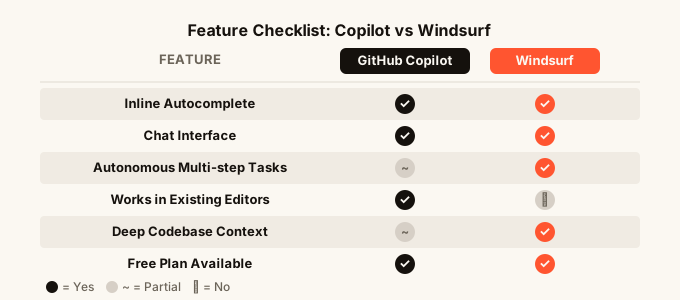
| GitHub Copilot | Windsurf | |
|---|---|---|
| Best for | Autocomplete + chat while coding | Autonomous multi-step tasks |
| Works in | Most popular editors | Its own editor (VS Code-based) |
| Main strength | Speed, familiarity, breadth | Agentic flow, context awareness |
| Free plan | Yes (limited) | Yes (limited) |
| Paid plans | From $10/month | From $15/month |
| Built by | GitHub (Microsoft) | Codeium |
| Installs as | Plugin | Standalone app |
What is GitHub Copilot?
GitHub Copilot is an AI coding assistant made by GitHub, which is owned by Microsoft. It plugs into editors like VS Code, JetBrains tools, and Neovim as an extension (a small add-on you install). As you type, it suggests the next line, the next function, or whole blocks of code. You press Tab to accept, or keep typing to ignore.
It also has a chat window where you can ask questions, explain errors, or ask it to rewrite a function. Think of it as a very smart autocomplete that also happens to answer coding questions.
Copilot launched in 2021 and now has millions of users. It is the most widely used AI coding tool in the world. That breadth matters: it has been trained on an enormous amount of code, so it recognises patterns across almost every programming language and framework (the particular set of tools a project is built with).
What is Windsurf?
Windsurf is an AI-powered code editor built by Codeium. Instead of being a plugin you add to another editor, Windsurf is its own application. It is built on the same foundation as VS Code, so it looks familiar, but the AI is woven much deeper into the experience.
The headline feature is what Windsurf calls “Flows.” Instead of just suggesting the next line, the AI can read your whole codebase (the collection of files that make up your project), understand what you are trying to do, and take multiple steps to get there. It can open files, make changes across several of them, run commands, and fix errors it finds along the way, all with minimal prompting from you.
This is sometimes called “agentic” coding, which just means the AI acts more like an agent handling a task than a tool waiting for your next instruction.

Head-to-head comparison
Autocomplete and in-line suggestions
This is Copilot’s home turf. Its suggestions appear instantly as you type, they are accurate, and after a few hours of use they start to feel like a second brain. It reads the file you are in and nearby files for context.
Windsurf also has inline suggestions and they are solid. But Copilot’s years of refinement show here. If raw, fast, line-by-line autocomplete is the main thing you care about, Copilot has the edge.
Handling multi-step tasks
This is where Windsurf pulls ahead. Ask it to “add a search feature to this page” and it will read the relevant files, write the new code, hook it up, and flag anything it could not do automatically. Copilot’s chat can help with this too, but it describes what you should do rather than doing it across multiple files in one move.
For vibe coding (describing what you want in plain English and letting the AI build it), Windsurf’s autonomous approach fits the workflow better.
Context awareness
Context means how much of your project the AI actually “reads” before it helps you. Windsurf is notably strong here. It indexes your whole codebase so it knows how your files connect, what functions exist elsewhere, and what your project’s patterns look like.
Copilot has improved its context handling, and recent versions can pull in more files than before. But Windsurf was designed from the ground up with deep context as a core feature, and that shows in practice.
Editor and setup experience
Copilot installs as a plugin in whatever editor you already use. If you are in VS Code today, you add Copilot in two minutes and keep working. Zero learning curve.
Windsurf asks you to switch editors. For many developers this is a real cost. Your keyboard shortcuts, themes, extensions, all need to migrate or be set up again. Windsurf makes the migration straightforward, but it is still friction that Copilot does not have.
Price
Copilot has a free tier with limited completions and a paid Individual plan at $10/month. Teams and Enterprise plans are available at higher prices with admin controls.
Windsurf also has a free tier and a paid Pro plan starting at $15/month. The free tier is generous enough to evaluate the tool seriously.
Neither is expensive relative to the time they save, but Copilot is cheaper if budget is a constraint.
Privacy and code security
Both tools have settings to control whether your code is used to train future models. Copilot for Business and Enterprise have explicit privacy guarantees. Windsurf has a Business plan with similar controls. If you are working on sensitive or proprietary code, read each provider’s privacy policy carefully and use the paid business tiers.
Language and framework support
Copilot’s training data is vast. It handles obscure languages, legacy codebases, and niche frameworks confidently. Windsurf performs well across popular languages but may be shakier on very unusual stacks.
Which should you use?
The honest answer depends on how you work, not on which tool is “better.”
Choose Copilot if: You write code all day and want the fastest, most reliable autocomplete. You work in a language or framework that is not mainstream. You do not want to change editors. You are on a team where your employer already pays for Copilot. You want the tool with the longest track record and the largest community of users who can answer your questions.
Choose Windsurf if: You want to describe a task and have the AI handle more of the execution. You are comfortable switching to a new editor. You work on projects where the AI understanding your whole codebase in one go would save you significant time. You are drawn to the more autonomous, agentic style of working that many people describe as the future of coding.
It is also worth knowing that these tools sit in the same category as others worth comparing. If you have not already, the Cursor vs Windsurf article covers the other major autonomous editor in detail, and the best AI code editors 2026 roundup puts all of them side by side. The GitHub Copilot vs Cursor comparison is also worth reading if Cursor is on your shortlist.
Can you use both?
Yes, and some developers do. Copilot in their everyday editor for quick work, Windsurf when they want to hand off a bigger task. That said, most people settle on one tool after a few weeks because switching between them adds mental overhead. Try each on a real project for a week before committing.

FAQ
Is Windsurf better than GitHub Copilot? Neither is universally better. Copilot is better at fast inline autocomplete and works inside your existing editor. Windsurf is better at handling multi-step, autonomous tasks across your whole codebase. The right choice depends on how you prefer to work.
Can GitHub Copilot do agentic coding like Windsurf? Copilot has added more agentic features over time, including the ability to run multi-step tasks in certain setups. But Windsurf was built with autonomous task execution as its core idea, so it feels more native and consistent in that mode.
Does Windsurf work with VS Code extensions? Windsurf is built on the same base as VS Code, so many extensions work. Most common extensions migrate without issues, but some very specific ones may not. Check the Windsurf docs for the current compatibility list before switching.
How does GitHub Copilot vs Windsurf compare on price? Copilot’s individual paid plan starts at $10/month. Windsurf’s Pro plan starts at $15/month. Both have free tiers that are usable enough to form a real opinion before paying.
Is Windsurf safe for private or work codebases? Both tools offer business plans with stricter data handling policies. If you are working with sensitive or proprietary code, use the paid business tiers and read each provider’s privacy documentation. Do not rely on the free tier for confidential work.
What if I want to build an app without writing code at all? Both Copilot and Windsurf are built for developers who already write code. If you want to describe an app and have it built for you without touching a code editor, omg.dev takes a different approach: you describe what you want, review the design, and the AI builds and hosts the working app. It is designed to be used from your phone and has sign-in, data storage, and real-time features built in from day one.
What is the learning curve for switching to Windsurf from VS Code? The editor looks and feels very similar to VS Code, so the core experience is familiar. The main adjustment is learning how to use Windsurf’s agentic features effectively: writing task prompts that give the AI enough context to act autonomously. Most developers report feeling comfortable within a few days of regular use. The bigger cost is migrating your personal setup, which takes a few hours rather than days.