Bubble vs Lovable: Which No-Code Tool Wins in 2026?
Bubble vs Lovable compared on ease of use, pricing, speed, and features. Find out which AI app builder is right for your next project in 2026.
TL;DR
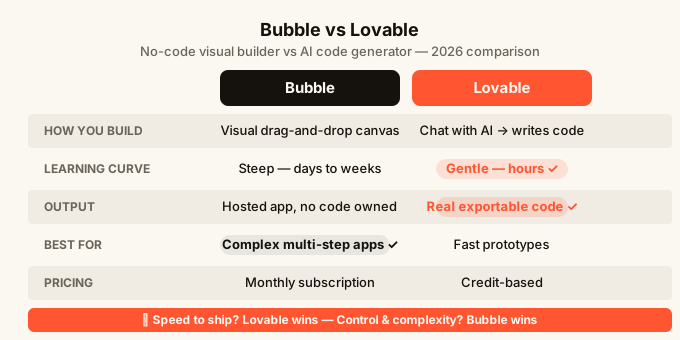
Bubble is a visual no-code builder where you drag, drop, and connect logic on a canvas. Lovable is an AI-powered builder where you describe what you want in plain English and it writes the actual code for you. Bubble gives you more control and is better for complex business apps. Lovable is faster for getting something on screen and better if you have no coding background at all. If you just want to ship something quickly from an idea, Lovable wins on speed.
| Bubble | Lovable | |
|---|---|---|
| How you build | Visual drag-and-drop canvas | Chat with AI, it writes the code |
| Learning curve | Steep (days to weeks) | Gentle (hours) |
| Output | Hosted app, no code you own | Real code you can export |
| Best for | Complex multi-step apps | Fast prototypes and simple products |
| Pricing model | Monthly subscription | Credit-based |
| Mobile building | Desktop browser only | Desktop browser only |
| Real-time features | Possible, needs setup | Built into some templates |
| Hosting | Included | Included |
What is Bubble?
Bubble has been around since 2012 and is one of the most established no-code tools (tools that let you build apps without writing code). You build by dragging elements onto a page, setting up workflows (sequences of steps that happen when a user clicks a button, submits a form, or triggers an action), and connecting everything to a database (where your app stores info like users, posts, or orders).
The upside of Bubble is power. You can build genuinely complex apps with it. Marketplaces, booking systems, CRMs (tools that track customer relationships), internal dashboards. There are thousands of templates and a large community.
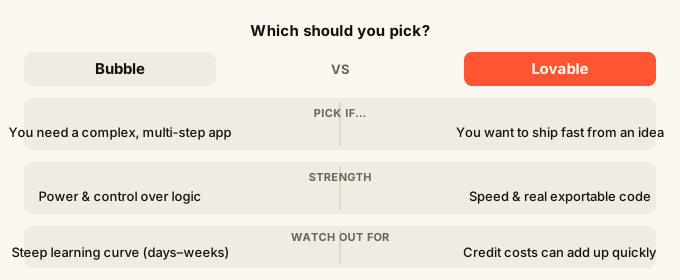
The downside is the learning curve. Bubble has a lot of menus, panels, and settings. Most people spend a week or more watching tutorials before they feel comfortable. It also runs on its own platform, so the app you build lives entirely inside Bubble’s system. You cannot take the code elsewhere.
What is Lovable?
Lovable is an AI app builder that arrived in a wave of tools that use large language models (AI that reads and writes text) to generate working code from a plain English description. You type something like “build me a task manager where teams can share lists” and Lovable produces a working app.
The key difference from Bubble is that Lovable generates real code behind the scenes. You can export that code and take it anywhere. It also means the output is a standard web app, not something locked inside a proprietary platform.
Lovable is faster to start. You can go from idea to something on screen in under an hour. But it has less fine-grained control than Bubble. If you want to build something with very specific business logic (complicated if/then rules, multi-step processes), you may find yourself fighting the AI to get exactly what you want.
Head-to-head: Bubble vs Lovable
Ease of getting started
Lovable wins here, and it is not close. You open the site, type your idea, and an app appears. There is no canvas to learn, no concept of workflows or data types to understand before you can do anything useful.
Bubble asks you to understand its mental model first. Elements, states, workflows, data sources. All of these have specific meanings inside Bubble and you have to learn them before the builder starts to feel natural. That learning investment does pay off later, but it is a real barrier at the start.
Speed from idea to working app
Lovable is faster for a first version. You can have something that looks like a real product in an afternoon. Bubble takes longer to set up even simple things because every action, condition, and data connection needs to be configured manually.
That said, Bubble is faster once you know it well. Experienced Bubble builders can assemble complex apps quickly because they understand exactly where every setting lives.
Control and customisation
Bubble wins. Its visual editor gives you precise control over layout, logic, and data. You can build multi-page apps with different user roles (for example, an admin who sees everything versus a customer who only sees their own orders), conditional visibility, complex search and filter logic, and payment flows.
Lovable is improving, but complex business logic still sometimes comes out wrong or requires multiple rounds of prompting to fix. You are trusting the AI to interpret your intent, which works well for straightforward apps and less well for anything with lots of edge cases.
Code ownership
Lovable wins. It generates real code you can export and host anywhere. If you outgrow Lovable or want a developer to take over, you have something to hand them.
Bubble locks you in. The app you build cannot be exported as code. If Bubble ever shut down or changed its pricing, you would need to rebuild from scratch on another platform.
Pricing
Both tools have free tiers with limits. Bubble’s paid plans are monthly subscriptions that scale with your app’s usage and features. Lovable uses a credit system where each build or significant edit costs credits.
For prototyping and early products, both are affordable. At scale, Bubble’s pricing becomes more predictable because it is subscription-based. Lovable’s credit model can catch you off guard if you do a lot of iterating.
Real-time and collaboration features
This one depends on what you need. Bubble supports real-time updates but they usually require careful setup. Lovable has some built-in templates for live collaboration, though the depth of real-time support depends on which template you start from.
If real-time features (multiple people seeing changes live without refreshing the page) are central to your app, check this carefully before committing to either tool.
Mobile experience
Neither Bubble nor Lovable is designed to be used from a phone. Both require a desktop browser to build comfortably. The apps they produce are responsive (they resize for phones), but the building experience itself is desktop-only.
This is worth knowing if you want to work on your app from wherever you are. Tools like omg.dev take a different approach and are designed specifically to be used from a phone, which changes what “working on your app” can look like.
Which should you use?
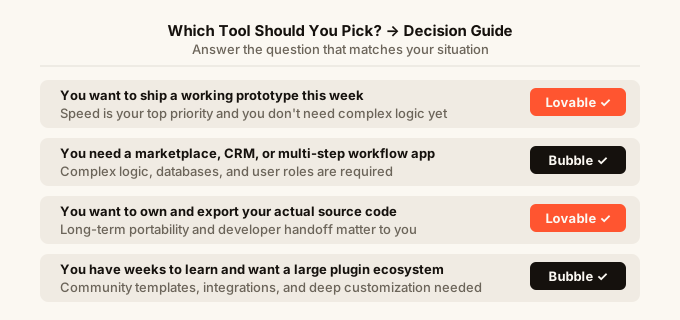
Pick Bubble if:
You are building something with real complexity. A marketplace where buyers and sellers interact. A booking platform with availability calendars. A SaaS tool (software people pay a monthly fee to use) with different permission levels for different users. Bubble can handle these. It will take longer to build, but the builder gives you the precision you need.
You also want to pick Bubble if you plan to build multiple apps over time and want to invest in learning one platform deeply. The community, templates, and plugins (extra pieces of functionality you can install) make the learning investment worth it for serious builders.
Pick Lovable if:
You have an idea and you want to see it on screen fast. A portfolio site, a simple internal tool, a landing page with a sign-up form, a prototype to show investors or customers. Lovable gets you there without a learning curve.
You should also lean toward Lovable if code ownership matters to you. If you want a developer to eventually take over, or if you want to customise things beyond what the builder allows, having real exportable code is a meaningful advantage.
For more context on how AI builders like Lovable fit into the broader picture, see the best AI app builder guide for 2026.
When neither is quite right
Both Bubble and Lovable assume you are working at a desk. If you want to build from your phone, or if you want to design what your app will look like before any code gets written (so you are not surprised by the output), those are gaps worth knowing about before you start.
The how to build an app without coding guide walks through the full range of options, including when different tools make sense.
FAQ
Is Bubble harder to learn than Lovable?
Yes, meaningfully so. Bubble has a visual system with its own vocabulary (workflows, states, data types) that takes real time to get comfortable with. Most beginners spend at least several days on tutorials before building confidently. Lovable lets you start with a sentence, which removes that initial barrier entirely.
Can I export my app from Bubble?
No. Bubble apps live on Bubble’s platform and cannot be exported as code. If you want code you own, Lovable exports the underlying code so you or a developer can take it elsewhere.
Which is better for a marketplace app?
Bubble. Marketplaces need complex logic: user roles, listings, search and filter, transactions, reviews. Bubble’s visual workflow builder handles that kind of complexity better than Lovable’s current AI generation. Lovable would struggle to get all that logic exactly right without a lot of back-and-forth prompting.
Which is cheaper for a small project?
Both have free tiers that are usable for early projects. For a simple prototype you iterate on quickly, Lovable’s credits can add up faster than expected. For something you build once and leave running, Bubble’s subscription can feel expensive at scale. Run the numbers for your specific use case before committing.
Does Lovable replace Bubble for serious apps?
Not yet. Lovable is getting better quickly, but for apps with significant business logic, multiple user types, and complex data relationships, Bubble still gives you more control. Lovable is the faster path for simpler products and prototypes. For a broader look at how these AI builders compare, the Lovable alternatives article covers more options.
Can I build from my phone with either tool?
Neither Bubble nor Lovable is designed for mobile building. Both work best on a desktop or laptop. If building from a phone is important to you, that is a real constraint to factor in when choosing a tool.
What if I want a design preview before my app is built?
Both Bubble and Lovable go straight to building without a separate design step. In Bubble you place elements yourself, so you control the look as you build. In Lovable the AI makes design choices for you, and if you do not like them you need to prompt again. A design-first approach, where you approve how things look before any code is written, is something to look for if visual output matters a lot to your project.