v0 vs Bolt: Which AI App Builder Should You Use?
v0 and Bolt both build apps from prompts, but they're for different jobs. Here's how to pick the right one for your project.
TL;DR
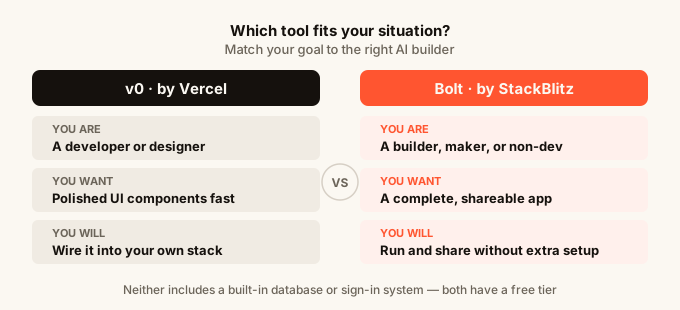
v0 is a UI-focused tool best for building polished interface components (individual screens or design pieces) that a developer will then wire up into a real product. Bolt is a full-app builder that gives you a working, runnable app from a single prompt. If you want a finished app you can share and use, Bolt is the closer fit. If you are a developer who wants great-looking UI components fast, v0 is the stronger choice.
| v0 | Bolt | |
|---|---|---|
| Made by | Vercel | StackBlitz |
| Best for | UI components and screens | Full working apps |
| Output | Frontend code to copy or deploy | Complete app you can run and share |
| Built-in database | No | No |
| Built-in sign-in | No | No |
| Mobile editing | No | No |
| Free tier | Yes (limited) | Yes (limited) |
| Works best for | Developers, designers | Builders, makers, non-devs |
What is v0?
v0 is a tool made by Vercel (the company behind many popular developer hosting products) that turns text descriptions into interface code. You type something like “a settings page with a profile photo, name field, and save button” and v0 generates the visual component for that.
The output is polished. v0 leans on a popular design system called shadcn/ui, which means the components it produces look consistent and professional right away. Developers love it because it saves hours of writing repetitive interface code by hand.
But v0 is not a full-app builder in the way most non-developers think of one. It gives you the visual layer, not the plumbing underneath. There is no built-in place to store data, no sign-in system, no hosting for end users. You get code to take somewhere else and use.
If you are not already a developer, you will hit a wall fairly quickly. v0 is a power tool for people who already know how to build apps and just want a head start on the look.
What is Bolt?
Bolt, made by StackBlitz, takes a different approach. You describe the app you want to build, and Bolt generates a complete, running application: front end (what users see), back end (the logic and data handling), and often a simple database setup.
You can preview the app right in the browser and share a link with someone else to try it out. That is a meaningful difference from v0, where you are working with code snippets rather than a live product.
Bolt is aimed at a wider audience than v0. Non-developers use it to prototype quickly. Developers use it to skip the boring setup work. The learning curve is gentler because you are judging the result by whether the app does what you need, not by whether the code looks right.
The catch: Bolt-generated apps often need extra work before they are production-ready (ready for real users). Things like sign-in, user data storage, and reliable hosting usually need to be handled separately or wired up manually after Bolt builds the initial version.

v0 vs Bolt: Head-to-Head
What you get from your first prompt
Type the same prompt into both tools and you will get very different results.
In v0, you get a visual component or a set of screens. It looks great. You can click around in the preview. But it does not do anything yet. There is no real data behind it, no logic connecting the pieces.
In Bolt, you get a working app. It might not look as refined as a v0 output right away, but clicking the buttons does something. The form submits. The list loads. It behaves like real software.
For anyone who wants to show something to a potential user, investor, or teammate, Bolt’s output is more useful from day one.
Design quality
v0 has the edge here. The components it generates follow a consistent design system, and the result is immediately close to what a professional designer would produce. If you care about polish and visual consistency, v0’s output is harder to beat.
Bolt’s designs are functional but more generic. You can prompt it to adjust the look, and it will try, but the fine-grained design control that v0 offers is not really Bolt’s focus.
If you are building something that needs to look impressive from the first click, you might find yourself wishing Bolt had more of v0’s visual precision.
Building a real, working app
Bolt wins clearly for this. A working app from one prompt, with logic and interactivity, is what Bolt was built to deliver.
v0 requires you to take the generated code and integrate it into a project yourself. That means setting up a codebase (a folder of files that forms your app), installing packages (chunks of pre-written code your app depends on), connecting a database (where your app stores info like users or posts), and deploying (putting the app on the internet so others can use it). None of that is trivial if you are not a developer.
Editing and iteration
Both tools let you keep prompting to refine the output. You describe what you want to change, and the AI updates the result.
v0 is particularly good at targeted edits to a specific component: “make the button blue, remove the border, add a hover effect.” Those small visual tweaks land reliably.
Bolt handles bigger changes well: “add a search bar that filters the list” or “let users delete items.” These are functional changes that touch multiple parts of the app, and Bolt manages them reasonably well in one go.
Can a non-developer actually ship something?
With Bolt, yes, partially. You can build an app, preview it, and share a link. Where things get harder is when you need real user accounts, persistent data that survives after you close the tab, or custom hosting on a domain you own. Bolt generates the app but does not provide those infrastructure pieces (the behind-the-scenes systems that keep an app running and storing data).
With v0, not really, unless you already know how to build apps. v0 is fundamentally a developer tool. It makes developers faster. It does not replace the need for development skills.
This is not a criticism of either tool. They were built for different audiences. But it matters a lot when you are deciding which one to open.
Cost
Both have free tiers with limits on how many generations (AI-powered builds) you can do per month. Heavy use costs money on both platforms. Neither is free without limits.
v0’s pricing is tied to the number of messages and generations you use. Bolt’s pricing works similarly, based on credits that get spent when you generate or edit apps.
Which Should You Use?
Use v0 if:
You are already a developer and you want to speed up the interface-building part of your work. You are building something in React (a popular framework, or structured way, for building web interfaces) and you want ready-to-use components that match a clean design system. You are not looking for a full app builder; you are looking for a way to write less repetitive code.
v0 is also useful if you are a designer who wants to communicate an idea in working code without writing it yourself, and you have a developer colleague who will take it from there.
Use Bolt if:
You want to go from an idea to a working, clickable app as fast as possible. You are a maker, founder, or non-developer who wants to build a prototype and show it to people. You care more about whether the app works than whether every pixel is in the right place.
Bolt is also a good fit if you are a developer who wants to skip the project setup phase entirely and start with a running base you can modify.
What if you want everything in one place?
Both v0 and Bolt leave gaps. v0 does not include the backend (the part of an app that handles data and logic). Bolt includes a backend but leaves you to sort out auth (the system that lets users create accounts and log in), hosting that is genuinely production-ready, and real-time features (where multiple users see changes instantly without refreshing the page).
If those gaps matter to you, tools like omg.dev take a different approach: built-in data storage, sign-in that works from day one, real-time collaboration, scheduled tasks, and hosting, all without setting any of that up yourself. It is also the only AI app builder designed to work from your phone, so you can build on the train or during your lunch break, not just when you are at a desk. Worth knowing the option exists.
For more on how these builders compare in a wider field, the best AI app builder for 2026 guide is worth reading alongside this one.
The real decision
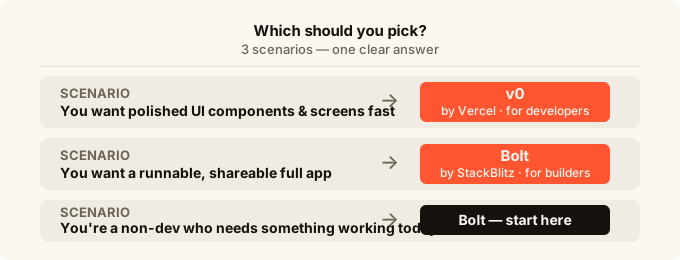
The honest answer is that v0 and Bolt are not really competing for the same job. v0 is a UI generation tool aimed at developers. Bolt is a full-app prototyping tool aimed at a wider group of builders.
If someone tells you “I use v0 for components and Bolt for full apps,” that is a sensible workflow, not a contradiction. Plenty of developers use both.
The question to ask yourself is: what do I need to walk away with today? A polished visual to hand off to a developer? Use v0. A working app I can share with someone? Use Bolt. An app that is actually ready for real users with accounts and stored data? You will need to add more pieces on top of either tool.
Understanding what vibe coding actually means as a workflow helps set the right expectations here. These tools are fast. They are impressive. But knowing where they stop and where you need to fill in the gaps is what separates a stalled project from a shipped one.
For a broader look at how these tools compare against others in the market, check out the Lovable alternatives guide and the Lovable vs Bolt breakdown. If you are just getting started and want to understand your options from the ground up, the how to build an app without coding guide is a good place to start.
FAQ
Is v0 free to use?
v0 has a free tier that lets you generate a limited number of components per month. Beyond that limit, you need a paid plan. The free tier is generous enough to evaluate the tool, but regular use will likely hit the ceiling.
Can I build a full app with v0?
Not without development skills. v0 generates the visual, interface layer of an app. To turn that into a full working product, you need to set up a project, handle data storage, add sign-in, and deploy it somewhere. v0 does not do any of that for you.
Does Bolt include hosting?
Bolt lets you preview your app and share a link while you are building it. For permanent, production hosting on your own domain, you typically need to export the project and deploy it to a separate hosting service. Check Bolt’s current documentation for the latest on this, as it changes.
Which is better for someone who has never written code?
Bolt is the more accessible starting point. You will get a working, clickable result faster, and you do not need to know how to handle code files. v0 is built for developers and assumes you know what to do with the code it gives you.
Can I use v0 and Bolt together?
Yes, and some developers do exactly this. They use v0 to generate polished UI components, then use Bolt (or another full-app builder) to assemble those components into a working product. It adds complexity, but if you are comfortable with both tools it can produce a better result than either alone.
How do v0 and Bolt handle editing after the first build?
Both support conversational editing, meaning you keep typing prompts to change the result. v0 is particularly reliable for small visual edits. Bolt handles larger functional changes well. Neither is perfect, and complex changes sometimes require multiple attempts or manual code editing.
What if I want real-time features, sign-in, and data storage without setting anything up?
Neither v0 nor Bolt includes those features out of the box. You would need to integrate separate services for each. If you want those things built in from the start with no setup, look at builders that package everything together rather than expecting you to wire it up yourself.