Claude vs ChatGPT for Coding: Which AI Wins in 2026?
Claude vs ChatGPT for coding compared head-to-head. See which AI writes better code, explains bugs clearer, and fits your workflow in 2026.
TL;DR
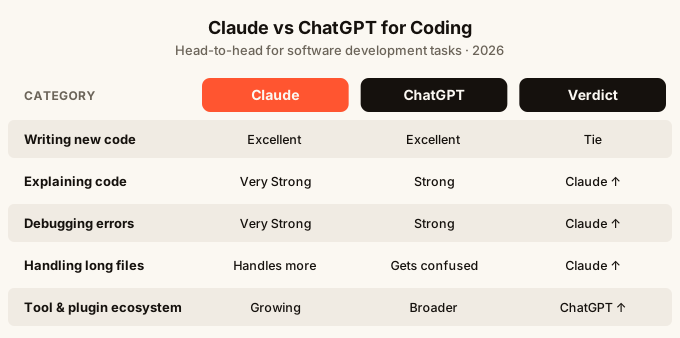
Claude and ChatGPT are both strong coding assistants, but they have different strengths. Claude tends to write cleaner code with better explanations and handles long files well. ChatGPT has a broader plugin and tool ecosystem and is more familiar to most people. If you are writing or debugging code day to day, Claude has a small but real edge. If you need to connect your AI to other tools or services, ChatGPT’s integrations give it more reach.
Quick comparison
| What you care about | Claude | ChatGPT |
|---|---|---|
| Writing new code from a description | Excellent | Excellent |
| Explaining what code does | Very strong | Strong |
| Debugging error messages | Very strong | Strong |
| Handling long files | Handles more at once | Gets confused faster |
| Following your style/instructions | Very consistent | Good, less consistent |
| Connected tools and plugins | Limited | Extensive |
| Free tier | Yes | Yes |
| Runs inside a code editor | Via third-party tools | Via third-party tools |
What is Claude?
Claude is an AI assistant made by Anthropic. You can use it at claude.ai, and there are also API access options (a way for developers to plug it into their own tools) and integrations with coding environments. The free tier is usable, and the paid plans unlock more powerful versions of the model.
For coding specifically, Claude has built a reputation for writing code that is clean and readable, explaining what it did in plain English, and sticking to your instructions without drifting. It also has one of the largest “context windows” (how much text it can read and hold in memory at once) of any public AI, which matters a lot when you paste in a long file and want it to understand everything before answering.
What is ChatGPT?
ChatGPT is made by OpenAI and was the first AI chat assistant most people ever used. It comes in several versions, with GPT-4o being the current headline model. The free tier is generous, and the paid tier (ChatGPT Plus) gives you access to the most capable models plus extras like image generation and data analysis.
For coding, ChatGPT is very capable. It can write functions, explain errors, suggest fixes, and walk you through building something step by step. Its biggest advantage is its maturity: it has been around longer, and a lot of developer tools, browser extensions, and workflows have been built around it. If you search for “how do I do X with an AI coding assistant”, most tutorials will assume you are using ChatGPT.
Head-to-head: Claude vs ChatGPT for coding
Writing code from scratch
Both models are genuinely good at turning a plain description into working code. You can say “write me a form that collects a name and email and shows a thank you message” and either will give you something reasonable.
Where they diverge is in what happens after that first response. Claude tends to produce code that is more consistent in style, uses clearer variable names, and adds comments that actually help. ChatGPT sometimes writes code that works but reads like it was produced by five different people on five different days.
For simple, self-contained tasks, the difference is small. For anything involving multiple files or a longer build, Claude’s consistency pays off.
Debugging and fixing errors
This is where a lot of people spend most of their time with an AI. You have an error message, you paste it in, you want an explanation and a fix.
Both models handle this well. Claude tends to explain the root cause more clearly, which helps you understand what went wrong rather than just copy-pasting a fix you do not understand. That matters if you are learning, because a fix you understand is one you can apply the next time.
ChatGPT is also solid here. It sometimes jumps to a solution faster without as much explanation, which can be useful if you just want the answer.
If you are learning to code or want to actually get better as you go, Claude’s explanations are worth more. If you just need the error gone, either works.
Reading and understanding long files
This is Claude’s clearest advantage for coding work today.
Claude’s context window, the amount of text it can read in one go, is significantly larger than what most ChatGPT tiers offer. In practice, this means you can paste an entire large file, or multiple files, and ask “what is this doing?” or “where is the bug?” and Claude will read all of it before answering.
ChatGPT can struggle when you paste in a lot of code at once. It may miss things near the top of a long paste because it ran out of memory partway through. On the paid tier with GPT-4o this is less of a problem, but Claude still has an edge.
For anyone working on a real project that has grown past a few hundred lines, this matters.
Following your instructions
You might tell an AI “always use plain JavaScript, never suggest TypeScript” or “keep all functions under 20 lines”. Sticking to those rules consistently over a long conversation is harder than it sounds.
Claude is notably better at this. It tends to hold onto your preferences throughout a session and call back to them without being reminded. ChatGPT drifts more often, especially in longer conversations, sometimes reverting to its default habits.
This is not a huge deal for one-off questions, but for builders who are having long, detailed conversations to work through a full feature, it adds up.
Explaining code to non-developers
If you are not a developer but you are working with AI to build something, you need the AI to explain what it did in a way you can actually understand and verify.
Claude is better here. Its explanations tend to use simpler language, break things into smaller steps, and acknowledge when something is a judgment call. You feel more like you are talking to a patient teacher than reading documentation.
ChatGPT can be equally clear, but it is more variable. Sometimes it over-explains with jargon, sometimes it under-explains and just gives you the code.
Tools, integrations, and ecosystem
This is where ChatGPT wins clearly.
Because ChatGPT has been around longer and has a much larger user base, there are far more tools built around it. Browser extensions, note-taking apps, project management tools, and coding environments all tend to have “ChatGPT integration” before they have “Claude integration”.
ChatGPT also has its own tools built in: the ability to run code directly in the chat, browse the web, analyze uploaded files like spreadsheets, and generate images. These are all available inside one ChatGPT Plus subscription.
Claude has fewer of these built-in extras, though it does have file uploads and can use tools in its more advanced settings. If you need an AI that connects to many other apps and services, ChatGPT has more out-of-the-box.
Which should you use?
Choose Claude if:
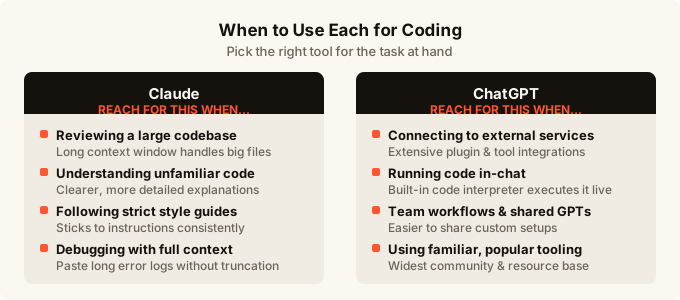
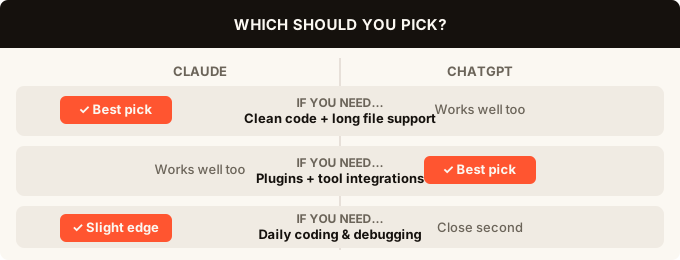
You are working on a real project with files that are getting long, you want clear explanations you can learn from, or you need the AI to follow specific rules and styles consistently. Claude is the better daily coding companion for most people who are building something over time.
Choose ChatGPT if:
You need to connect your AI to a wide range of other tools, you want built-in code execution or web browsing inside the chat itself, or you are already deeply in a workflow built around ChatGPT. Also choose ChatGPT if you want more community resources: tutorials, prompt libraries, and community forums are more abundant there.
Use both if you can
Neither model is perfect, and they make different mistakes. Some builders keep both open and use Claude for writing and reviewing code, and ChatGPT for research and connecting to other tools. If you are on free tiers, both are usable at no cost, so trying both is practical.
For people who want to understand the broader shift in how software gets built today, the article on what is vibe coding gives a good grounding in why these tools matter.
If you are interested in the actual code editors and environments where Claude and ChatGPT get used, the best AI code editors for 2026 piece covers the landscape in detail.
What about building a full app, not just asking coding questions?
Asking an AI to write a function is one thing. Actually shipping an app is another.
Both Claude and ChatGPT can help you write code, but they do not give you a live, hosted app at the end. You still need to set up hosting (a server that makes your app accessible on the internet), a database (a place for your app to store information), user sign-in, and more. If you are not a developer, that is a lot of glue work that can stop a project before it starts.
Tools like omg.dev take a different approach. Instead of giving you code to paste somewhere, it builds a real working app from your description, with hosting, data storage, and sign-in all included. You can do it from your phone. It is a different category from Claude or ChatGPT, but worth knowing about if your goal is a finished app rather than a code snippet.
For a fuller look at how AI app builders compare to each other, the best AI app builder for 2026 roundup is a useful next read. And if you have never built an app before and are wondering where to start, how to build an app without coding walks through the options honestly.
If you are already in a code editor and wondering which AI assistant to add on top, the comparison between Cursor vs Claude Code covers the more advanced end of the spectrum.
FAQ
Is Claude or ChatGPT better for coding in 2026?
For most coding tasks, Claude has a small but consistent edge: cleaner code, better explanations, and stronger handling of long files. ChatGPT is excellent and has more built-in tools, but if writing and understanding code is your main goal, Claude is the better daily choice.
Can I use Claude or ChatGPT inside my code editor?
Both can be connected to popular code editors through third-party tools and extensions, though neither is built into an editor natively the way some dedicated coding assistants are. The best AI code editors for 2026 covers which editors have the tightest AI integration.
Which is better for beginners learning to code?
Claude, mostly because of how it explains things. It tends to break down what the code is doing, why a bug happened, and what the fix means, rather than just handing you a solution. That feedback loop helps you learn. ChatGPT can do this too, but Claude does it more consistently.
Does Claude or ChatGPT make fewer coding mistakes?
Both make mistakes. Neither model is reliable enough to ship code without reading it yourself. Claude’s mistakes tend to be smaller and easier to spot because the code is cleaner. ChatGPT’s mistakes can sometimes be hidden in more complex output. Always read what either model gives you before using it.
Can I use both for free?
Yes. Both Claude and ChatGPT have free tiers that are usable for coding. The free tiers limit how much you can use them in a day and give you access to slightly less capable versions of each model. The paid tiers are meaningfully better for long coding sessions.
What if I want to build an app, not just write code?
Then you need more than an AI chat window. You need hosting, a database, sign-in, and a way to deploy your app so other people can use it. AI coding assistants like Claude and ChatGPT give you code; an AI app builder gives you a working product. Tools like omg.dev handle the whole thing and require no prior coding experience.
Is ChatGPT better for connecting to other tools and services?
Yes. ChatGPT has a significantly larger collection of integrations, plugins, and third-party tools built around it. If your workflow involves connecting your AI to spreadsheets, project management apps, or external services, ChatGPT is the more practical choice today.